Who This Guide Is For (And What You’ll Learn)
If you run a construction company, contracting firm, or EPC business, you’ve probably heard vendors pitch ERP as the answer to all your problems. Yet many teams are stuck in generic systems that feel like expensive accounting software with extra steps. This guide explains what construction ERP actually is, why generic ERP struggles in this industry, and how to decide which approach fits your business.
By the end, you’ll be able to:
- Understand the structural differences between generic and construction‑specific ERP.
- Recognize real‑world signs your current system is failing your projects.
- Use a clear checklist to evaluate and shortlist construction ERP vendors.
Table of Contents
ERP 101: What Generic ERP Systems Are Designed To Do
ERP (Enterprise Resource Planning) systems started as a way to unify core business functions-finance, HR, procurement, inventory, and reporting-into one integrated platform. Generic ERP is built to work across multiple industries, so it uses standard modules and workflows that can be configured for manufacturing, trading, services, and more.
In most cases, generic ERP:
- Organizes data around departments (finance, HR, stores) and cost centers.
- Focuses on financial control, standard inventory, and sales/purchase processes.
- Assumes relatively repeatable operations-similar products, standard orders, predictable cycles.
This works well in product‑driven businesses, but construction is very different.
Why Construction Is a Different Beast Altogether
Construction is project‑centric, not product‑centric. Every job is unique, long‑running, and executed across changing sites with many moving parts. A single mistake in estimating, procurement, or billing can wipe out the profit on an entire project.
Some realities that make construction different:
- Multi‑site operations: Materials, equipment, and people move constantly between central stores, yards, and remote sites.
- Subcontractor‑heavy execution: Subcontractors, specialist agencies, and JV partners must be tracked with complex contracts, retention, and variations.
- Complex billing: RA/progress bills, milestone payments, advances, retention, and variation claims are standard, not exceptions.
- Frequent change: Design changes, site conditions, and client requests trigger cost and schedule shifts that must be reflected in real time.
Generic ERP can be bent to handle some of this, but only with heavy customization and spreadsheets filling the gaps.
What Is Construction ERP?
Construction ERP is an ERP platform designed from day one around projects, jobs, and sites, not just departments and cost centers. Instead of treating projects as one more “dimension,” construction ERP makes them the central organising principle of the entire system.
In a true construction ERP:
- Every transaction-material issue, PO, GRN, labour entry, equipment usage, subcontractor bill, RA bill-is tagged to a project, site, BOQ/WBS code, or activity.
- Project managers see real‑time planned vs actuals for cost, quantities, and progress at the granularity they need.
- Site engineers, storekeepers, and finance teams all work on the same data, just with different views and permissions.
The result is a system that speaks the language of construction instead of forcing you to translate your operations into generic ERP structures.
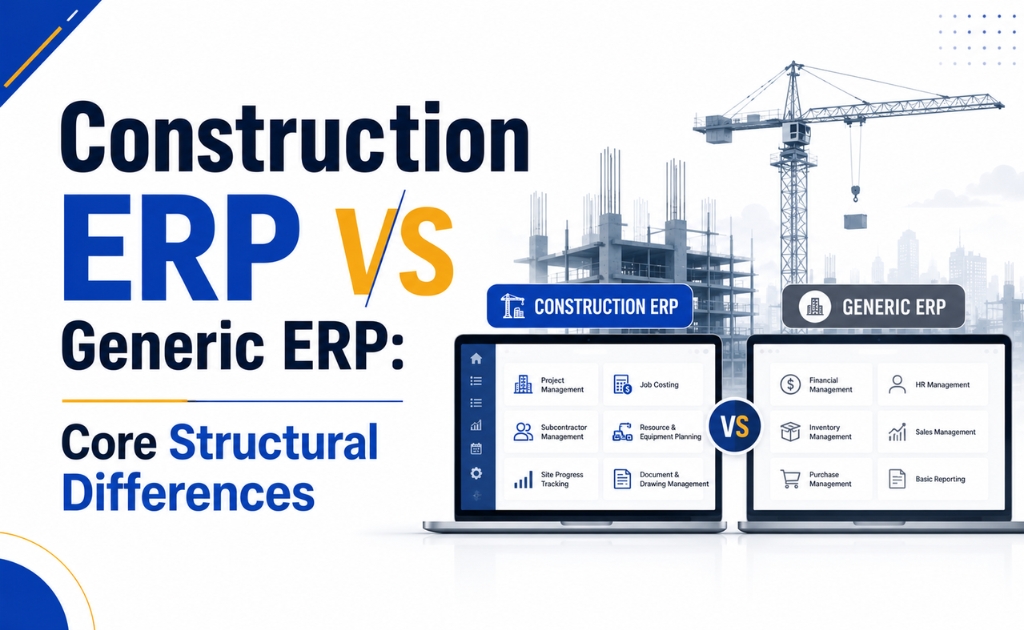
Construction ERP vs Generic ERP: Core Structural Differences
1. Data Model – Project‑Centric vs Department‑Centric
Generic ERP starts with departments and GL accounts; projects are often added as extra fields or dimensions in finance and inventory modules. That makes it difficult to see a complete project picture without complex reports, manual joins, or custom cubes.
Construction ERP, on the other hand, is built around:
- Projects / jobs.
- Phases / WBS / BOQ items.
- Sites / locations.
Departments still exist, but they sit around the project—not the other way around—so you can drill down from project to phase to activity to individual transactions in a natural way.
2. Job Costing and Budget Control
In construction, job costing is everything. A small overrun on steel, concrete, or labour can destroy margins. Construction ERP gives you:
- BOQ‑linked budgets and cost codes.
- Planned vs actual tracking by activity, line item, and phase.
- Cost‑to‑complete and forecast margin at project and portfolio level.
Generic ERP typically offers cost centers and high‑level budget vs actual, but not the line‑item BOQ view construction needs. This pushes many companies back into Excel for serious project costing.
3. Procurement and Inventory Workflows
In a generic ERP, procurement is usually driven by simple reorder levels and standard POs for stock items. Construction ERP adds domain‑specific flows:
- Material requirements driven by BOQ, project schedule, and site needs.
- Multi‑site requisitions and approvals with visibility across projects and central stores.
- Site‑to‑site and store‑to‑site transfers with full traceability.
Without these, most construction companies end up managing material planning, site requests, and transfers with Excel sheets, PDFs, phone calls, and WhatsApp messages.
4. Billing, RA Bills, and Retention
Construction ERP supports the billing patterns the industry actually uses:
- RA/progress billing based on achieved quantities or milestones.
- Retention, advances, and recovery logic built into billing and contracts.
- Subcontractor bills aligned with main contract progress and variations.
Generic ERP is designed for straightforward invoices—sell a product, raise an invoice, collect payment—and usually needs heavy customization for RA bills and retention.
5. Site Reporting and Mobile Usage
On construction projects, the truth lives on site—not in the office. Construction ERP typically includes:
- Mobile apps or web portals for daily progress reports, labour attendance, and material receipts.
- Photo attachments, checklists, and snag/safety forms that directly feed into project and cost data.
Generic ERP tends to be office‑centric, with limited, clunky, or non‑existent tools for site teams, so information arrives late and incomplete.
6. Compliance and Industry Regulations
Construction ERP often incorporates construction‑specific processes such as retention handling, contract clauses, and region‑specific tax and regulatory requirements for projects. Generic ERP usually covers generic tax and finance but relies on customizations or add‑ons for contract and project compliance.
7. Implementation Effort and Customization
Trying to bend generic ERP into a construction shape typically requires:
- Months of process mapping and custom development.
- Complex, fragile customizations that are hard to maintain or upgrade.
- Higher total cost of ownership over the system’s lifecycle.
Construction ERP comes with industry‑ready workflows and reports, cutting implementation time and risk—as long as you choose a product tuned to your segment and region.
Real‑World Signs Your Generic ERP Is Failing Your Projects
Many businesses only realize their ERP doesn’t fit when they look at the actual day‑to‑day behavior of their teams. Typical symptoms include:
- Finance vs projects don’t match: Project managers maintain their own cost reports in Excel because ERP numbers “don’t reflect reality”.
- Site teams avoid the system: Engineers and supervisors log progress, labour, and material usage in WhatsApp, notebooks, or spreadsheets, not in the ERP.
- RA bills and variations live outside ERP: Critical commercial elements are tracked through parallel documents and manual reconciliations.
- Month‑end is painful: Closing projects and accounts requires chasing data across systems, with disputes over which version of the truth to believe.
- No early warning on overruns: You learn about cost overruns after the fact, when invoices have already hit finance, not when consumption patterns started drifting.
If these patterns feel familiar, you’re likely fighting the limits of a generic ERP instead of benefiting from it.
When Generic ERP Can Still Work (And When It Can’t)
It’s honest to say that not every construction firm needs a full‑blown construction ERP on day one. Generic ERP (or even just accounting software) plus spreadsheets might be workable if:
- You handle a small number of simple, short‑duration projects at a time.
- You operate mostly from one location with limited site movement.
- Billing is straightforward and doesn’t involve RA bills or complex subcontracting.
However, construction ERP becomes essential when:
- You manage multiple concurrent projects and sites.
- You rely heavily on subcontractors and specialist agencies.
- RA billing, milestone payments, and retention are the norm.
- You need real‑time project profitability and cost‑to‑complete visibility.
- You’re expanding into new geographies or larger, more complex projects.
At that stage, staying on a generic platform usually means living with blind spots, manual work, and growing financial risk.
How to Evaluate Construction ERP Vendors Without Getting Lost in Features
Start With Your Processes, Not the Product Brochure
Before you attend yet another demo, document how your business actually works today:
- How do you estimate jobs and link them to BOQ/WBS structures?
- How do you plan and approve procurement for each project?
- How do sites request materials and record usage?
- How are RA bills, variations, and subcontractor bills prepared and approved?
- How do you track labour, equipment, and indirect costs at project level?
This process map becomes your evaluation checklist. Instead of asking, “What modules do you have?”, you can ask, “Show me exactly how your system supports this workflow.”
Non‑Negotiable Capabilities to Look For
When comparing construction ERP vendors, make sure they can demonstrate, live, at least these capabilities:
- Job costing tied to BOQ/WBS with planned vs actual tracking.
- RA and milestone billing, including retention, advances, and recovery.
- Subcontractor and vendor management, including back‑to‑back contracts.
- Multi‑site inventory control, including site requisitions and transfers.
- Mobile‑friendly site reporting for progress, labour, and material usage.
- Region‑specific tax and compliance support for your markets.
If a vendor struggles to show these without promising “future customizations,” that’s a red flag.
Smart Questions to Ask in Every Demo
Go beyond slideware and ask pointed, scenario‑based questions:
- “Show me how you handle a change order—from site request to commercial impact on the project.”
- “Demonstrate how an RA bill is prepared, including retention and previous bill adjustments.”
- “How would a site engineer raise a material request from the field, and how does stores and procurement see it?”
- “What reports do project managers use weekly to track cost‑to‑complete and margin?”
The answers will tell you very quickly whether you’re looking at a construction ERP or a generic platform with cosmetic tweaks.
Moving From Generic ERP to Construction ERP: A Practical Roadmap
Switching platforms is a big decision, but it becomes manageable when approached step by step:
- Audit your current landscape
List all tools used across departments: ERP, accounting software, spreadsheets, project tools, and custom apps. Identify overlaps, gaps, and manual bridges. - Prioritize critical workflows and projects
Don’t try to “boil the ocean.” Pick key workflows (e.g., job costing, RA billing, site inventory) and a small set of representative projects for phase‑1. - Clean and structure your master data
Standardize project codes, BOQ/WBS, material masters, vendor lists, and cost codes. Good master data is essential for a smooth ERP implementation. - Run a pilot on 1–2 projects
Implement the construction ERP on a limited scope, refine configurations, and collect feedback from site and back‑office teams. - Train and enforce new ways of working
Ensure site engineers, storekeepers, and project managers actually use the system instead of defaulting back to Excel. That’s the only way to get reliable, real‑time data. - Scale gradually across portfolio
Once the pilot stabilizes, roll out to more projects and functions in a controlled manner, with clear ownership and governance.
With the right product and approach, the move from generic to construction ERP becomes a structured transformation rather than a risky big‑bang change.
Bringing It All Together (And a Practical Next Step)
Generic ERP is great at standardizing back‑office work, but construction needs more than that—it needs a system that understands projects, sites, BOQ, RA bills, and subcontractors by design. A construction ERP reframes everything around projects so you can see risks early, control costs in real time, and run multiple jobs without losing financial visibility.
If you’re seeing the warning signs—Excel‑driven project control, site teams bypassing your ERP, and constant disputes over project costs—it’s probably time to evaluate a construction‑specific platform. TDIT Solution’s construction ERP and inventory solutions are built precisely for these realities, helping contractors and builders connect sites, stores, and back‑office into one construction‑first system that supports how your projects actually run.
Trusted Partner Of Oracle